
In a world where information moves faster than ever, the ability to capture, organize, and recall ideas efficiently has become a critical skill. Whether you’re managing work projects, building a business, planning personal goals, or simply trying to keep your life organized, note-taking apps have become essential tools.
But traditional note-taking apps are quickly evolving thanks to artificial intelligence. Today’s AI-powered note apps do far more than store text. They can summarize meetings, organize thoughts automatically, generate ideas, and even help you find important information instantly.
If you’re trying to become more productive and organized, the right AI note-taking app can save hours of work every week.
In this guide, we’ll explore the best AI note-taking apps for work and life, what makes them powerful, and how to choose the right one for your workflow.
Why AI Note-Taking Apps Are Becoming Essential
Traditional note-taking apps require users to manually organize information, tag notes, and search through documents. AI changes that process entirely.
Modern AI-powered apps can:
- Automatically summarize notes
- Organize ideas into structured pages
- Generate action items from meetings
- Suggest related notes
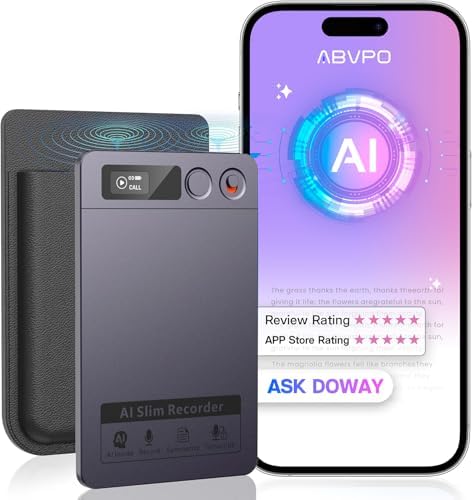
- Turn voice recordings into searchable text
These features help professionals manage large amounts of information without spending hours organizing it manually.
AI-powered productivity tools are growing rapidly, and many of the most popular productivity platforms now include built-in artificial intelligence features.
For example, tools like Notion AI and Evernote have added powerful AI features that help users write, summarize, and organize content faster than ever.
For professionals, entrepreneurs, and creators, these tools can dramatically improve workflow and productivity.
1. Notion AI
One of the most powerful productivity tools available today is Notion AI.
Notion began as a flexible workspace that combines notes, project management, and collaboration. With the addition of AI features, it has become one of the most powerful knowledge management tools available.
Notion AI allows users to:
- Summarize long notes instantly
- Generate ideas and outlines
- Turn notes into action lists
- Improve writing clarity
- Translate content into multiple languages
The real strength of Notion is its flexibility. Users can build custom workspaces that include task lists, documents, databases, and collaborative workspaces.
This makes it especially useful for:
- entrepreneurs
- content creators
- remote teams
- students
Because everything is stored in a single connected workspace, Notion AI becomes a central knowledge hub for both work and personal projects.
2. Mem AI
Another powerful AI note-taking tool gaining popularity is Mem AI.
Mem is designed to reduce the need for manual organization. Instead of forcing users to categorize everything, the AI automatically connects related notes together.
Mem focuses on:
- automatic organization
- AI-powered search
- contextual note connections
This means you can quickly find ideas, notes, or conversations without worrying about folders or tags.
Mem also includes an AI assistant that can summarize notes, answer questions about stored information, and help generate new ideas.
For people who capture lots of thoughts throughout the day, Mem is an excellent tool for turning scattered ideas into structured knowledge.
3. Evernote
One of the oldest and most well-known note-taking apps is Evernote.
Over the years, Evernote has evolved from a simple note app into a powerful productivity platform that now includes AI capabilities.
Modern Evernote features include:
- AI search tools
- document scanning
- web clipping
- note summarization
- task management
Evernote is especially useful for people who collect large amounts of research, articles, and documents.
Its web clipper tool allows users to save entire webpages directly into organized notebooks, making it an excellent tool for research and knowledge management.
4. Microsoft OneNote with Copilot
Microsoft’s note-taking platform, Microsoft OneNote, has become even more powerful with the addition of AI features through Microsoft Copilot.
Copilot integrates with Microsoft’s productivity ecosystem, allowing users to:
- summarize notes
- generate meeting summaries
- create action lists
- answer questions based on stored notes
For people who already use Microsoft 365 tools like Word, Outlook, and Teams, this integration makes OneNote an extremely powerful productivity hub.
5. Otter AI
If you attend a lot of meetings, interviews, or lectures, Otter.ai is one of the best AI note-taking tools available.
Otter specializes in automatic voice transcription and meeting summaries.
Key features include:
- real-time transcription
- meeting summaries
- speaker identification
- searchable transcripts
Otter integrates with popular meeting platforms such as Zoom and Google Meet, automatically recording conversations and turning them into organized notes.
For professionals who attend frequent meetings, this tool can eliminate the need for manual note-taking entirely.
Key Features to Look for in an AI Note-Taking App
Not all AI note-taking tools are created equal. When choosing the right app, it’s important to consider the features that best fit your workflow.
AI Summaries
The ability to summarize long notes quickly saves time and helps identify key ideas.
Powerful Search
AI search tools make it easier to find important information quickly.
Cross-Platform Sync
Your notes should be accessible across devices including phones, tablets, and computers.
Voice Transcription
Speech-to-text features can capture meetings, lectures, and brainstorming sessions.
Collaboration
Many apps allow teams to share notes and workspaces for collaborative projects.
How AI Note-Taking Improves Productivity
AI note-taking apps don’t just store information—they actively help users think, organize, and plan more effectively.
These tools can:
- capture ideas instantly
- reduce time spent organizing information
- generate summaries and insights
- make knowledge easier to access
For professionals juggling multiple responsibilities, AI tools can act like a digital assistant that helps keep everything organized.
As AI technology continues to evolve, these tools will likely become even more powerful and integrated into everyday work.
Final Thoughts
Information overload is one of the biggest challenges of modern life. With emails, meetings, documents, and ideas constantly flowing, it’s easy to lose track of important information.
AI note-taking apps solve this problem by helping you capture, organize, and retrieve knowledge effortlessly.
Whether you prefer the flexible workspace of Notion, the intelligent organization of Mem, or the meeting transcription power of Otter, there are powerful tools available for every workflow.
By adopting the right AI note-taking app, you can dramatically improve productivity, stay organized, and focus on the work that matters most.
Affiliate Disclosure: As an Amazon Associate, I earn from qualifying purchases. This post contains affiliate links, which means if you click and make a purchase, I may receive a small commission at no extra cost to you. I only recommend products I personally use or believe add real value. Thank you for supporting The Right Man Mindset.